Cashier shifts
A shift connects a cashier to a cash drawer and records opening and closing counts for review.
Start a shift
- Confirm the active branch.
- Count the physical cash in your assigned drawer.
- Open Register → Check In.
- Select the Cash drawer Fund Source.
- Enter the counted Cash Beginning (Float Amount) and any notes.
- Select Start Shift & Check In and verify that the shift is active.
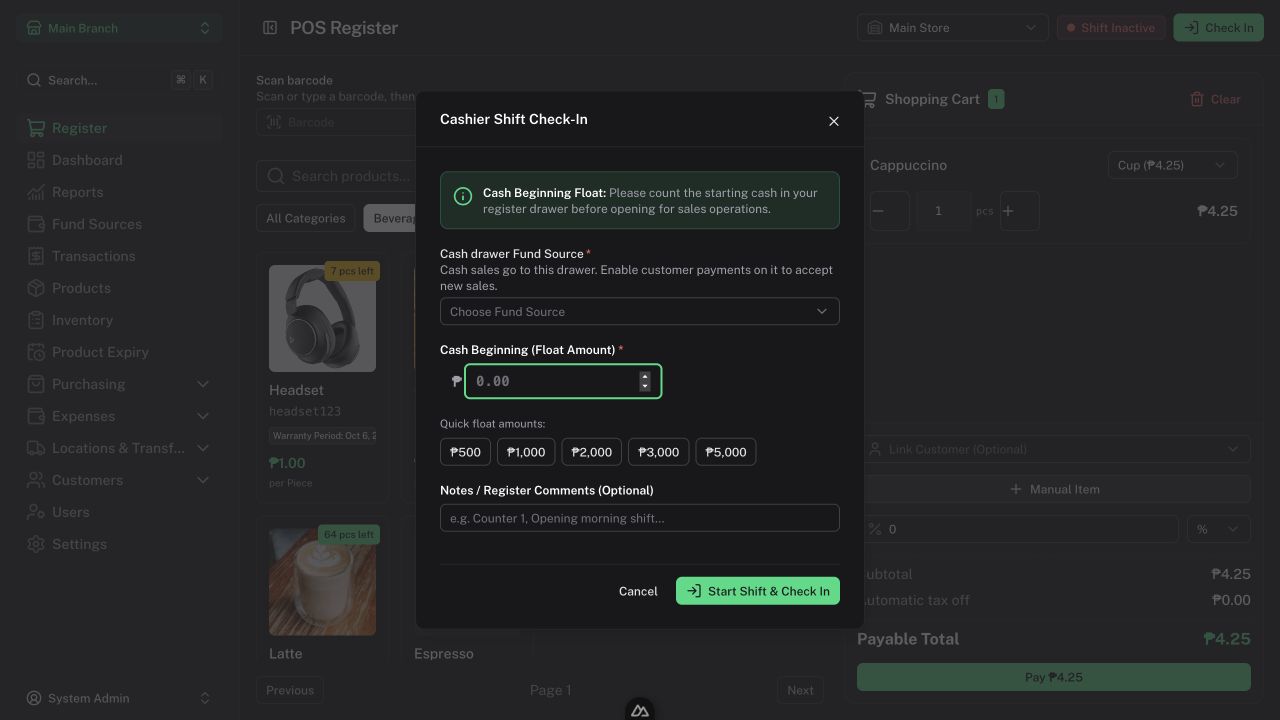
One drawer can have only one active shift. To accept new customer cash payments, it must be an ordinary cash source enabled for customer payments. Ask an Admin if no suitable drawer is available.
Understand expected cash
Expected closing cash = book opening balance + posted movements in that drawer.
Movements can include cash sales, customer collections and refunds, supplier/expense payments, adjustments, and fund transfers. A movement posted by another authorized user still belongs to the occupied drawer's active shift.
The counted opening float and closing count are declarations. Entering either does not add money or correct the Fund Source balance.
End a shift
- Complete the current checkout and count the drawer.
- Open the Register's end-shift action.
- Enter Counted Cash End (Drawer Cash).
- Add useful handover notes.
- Select Close Shift & Handover.
- Review the handover summary and any discrepancy.
Tell the Manager or Admin about a discrepancy. An Admin reconciles a verified balance difference separately through Fund Sources with a reason.
Review shift history
Managers and Admins use Reports → Cashier Audits to inspect shift records. Later refunds belong to the issuing shift; they do not rewrite an earlier closed shift.
Inventory End of Day (EOD) is a separate stock reporting process, not the drawer's closing count.